


Holy Bible King James + Audio
4.828.84K Reviews
App Specs
- Version
- 10.2.557
- Updated On
- License
- Free
- Downloads
- 1,000,000+
- Developer
- Tecarta, Inc.
- Categories
- Books & Reference
- Platform
- Android
Screenshots
 Analysis by AppCompare
If you’re opening Holy Bible King James + Audio for the first time, it helps to know what kind of experience you’re choosing: this is a Bible-reading app built around the King James text, with audio and reference tools for fitting scripture into ordinary routines. I’d treat it as a practical companion for reading, listening, and looking up passages, rather than expecting a guided course that tells you what to study next.
What to expect from a KJV-focused Bible app
The King James wording has a distinctive, traditional style. If you already know it, having that translation on your phone makes familiar passages easy to revisit. If you’re new to it, the phrasing can feel formal compared with contemporary translations. I’d give it a short reading session before deciding whether it suits you: the same language that feels rich and memorable to some readers may take more effort to follow for others.
The app is free to install, though it offers in-app purchases ranging from $0.99 to $299.99 per item. That makes it sensible to explore the free experience first and check the details of any purchase before confirming it. Tecarta, Inc. is the developer. The app has a 4.8 average from around 140,000 ratings and more than a million installs, but popularity can’t tell you whether the KJV style or the listening experience fits your habits.
Getting started without overthinking setup
Once installed, I’d start by opening a book and chapter you already know. That gives you an easy way to judge the text, controls, and reading comfort without having to learn the whole library at once. The app is rated for Everyone and requires Android 8.0 or later; its current version is 10.2.270. It was released on May 29, 2010, so it has been around for years, while the version number reflects its ongoing development.
Before settling in, adjust the font and display to suit the moment. Larger text can make a focused reading session more comfortable, while a darker display may be easier on the eyes at night. These are useful small choices, not a substitute for a larger screen: if you plan to study for a long time, a tablet or printed Bible may feel less cramped than a phone.
Your first useful session: read, listen, or search
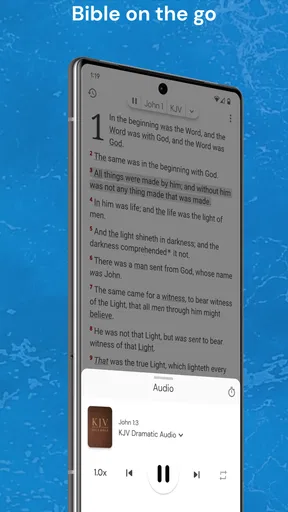
A simple first routine is to read a short passage, then try the audio when your hands are busy. The dramatic narration gives you another way to engage with the KJV, especially during a walk or a quiet task at home. I wouldn’t assume that listening always replaces reading; audio is convenient, but it can be easier to miss a phrase when your attention is divided. For careful study, I prefer to pause and read the passage on screen as well.
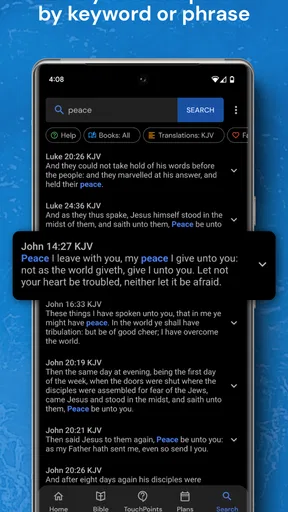
If a verse is on the tip of your tongue, search can save the time of browsing book by book. Try a distinctive word or a short phrase rather than a vague recollection, then check the surrounding verses so the result makes sense in context. The app also includes Strong’s Concordance, which can support closer word study. I’d use it as a reference aid, not as a shortcut to interpreting a passage: the meaning of a word depends on how it is used, and a concordance works best alongside the surrounding text.
Worth Reading Before You Choose

EA SPORTS FC Mobile 26 Is a Bigger Football Game, but It Takes Time

Flipboard Shows What News Apps Must Do Beyond the Feed

Switching to Android Auto Means Rethinking Your Driving Routine

Google Calendar Makes a Crowded Week Easier to Manage

Ludo King Makes the Most of the Minutes Between Plans

Baby Panda World Brings Quick Play to Modern Phones, but Its Game Library Feels Busy
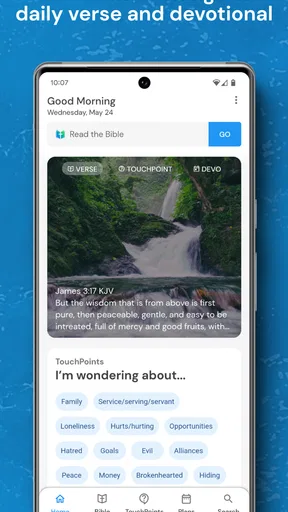
The daily verse can be a low-effort starting point on a busy morning. Instead of treating it as a complete study, I’d read the lines around it and see what the passage is saying as a whole. That extra step is helpful when a single verse is shared without its context, and it turns a quick glance into a more thoughtful reading.
Making the tools work for real routines
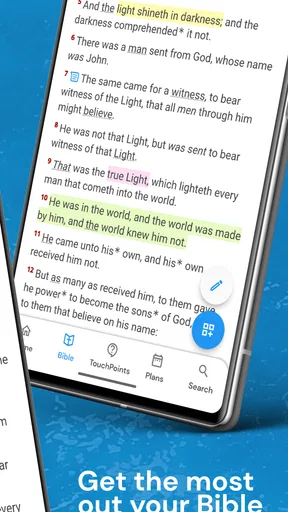
Bookmarks are useful when your reading happens in short stretches. I’d save a place as soon as I stop, especially if I switch between reading and audio or expect to return later. That creates a simple personal trail through the text without requiring you to remember a chapter number. If you’re using the app for a group discussion, you can also share a verse through messaging or social apps, then keep the full passage open for your own reference.
One practical trade-off is that phone-based reading invites interruptions. I find it helps to decide what I’m doing before opening the app: a few minutes of reading, a passage lookup, or audio while walking. That small intention makes it less likely that a useful reference session turns into aimless screen time. For audio, choose a safe moment when you don’t need to watch the screen or manage other tasks that demand your attention.
If you’re comparing it with other Bible apps, the main question is what you want from the translation and study approach. Someone who prefers modern wording, several translations side by side, or a structured reading plan may be better served by an app centered on those needs. A printed KJV offers a calmer, screen-free experience, while this app is more convenient when you want audio, quick search, and a reference tool together. I see its strongest fit as portable access to one familiar translation, rather than an all-purpose substitute for every kind of Bible study.
First Impressions and User Interface
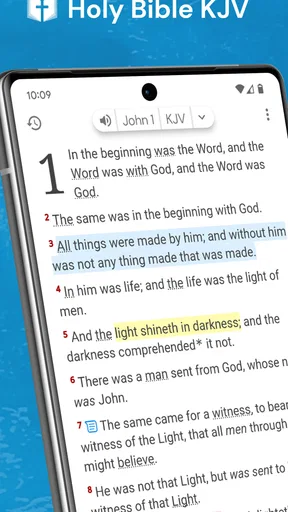
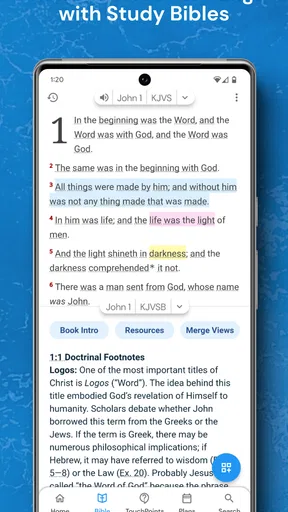
When you first open the app, you’re greeted with a clean and intuitive interface. The developers have done a splendid job keeping it user-friendly. The navigation is smooth, with easy access to various books and chapters. You don’t need to be a tech wizard to get around, which is a huge plus in my book.
What really caught my eye was the customizable reading experience. You can adjust the font size, switch between day and night modes, and even choose different background colors. It’s all about making your reading as comfortable as possible. I often find myself switching to night mode for a more relaxed reading session before bed.
Audio Features That Impress
The audio feature is where the Holy Bible King James + Audio truly shines. Having the ability to listen to the Bible being read aloud is a blessing, especially during long commutes or when you want to multitask. The narration is clear and soothing, making it easy to follow along. It’s like having a personal narrator at your disposal.
One feature I love is the ability to bookmark where you left off, whether you’re reading or listening. It’s simple but incredibly handy. This way, you can always pick up right where you left off without any hassle.
Additional Tools and Features
The app isn’t just about reading or listening. It includes a variety of helpful tools such as a verse of the day, daily devotionals, and a search function that lets you quickly find passages. The search feature is particularly robust, allowing you to look up specific words or phrases in a snap. This is perfect for those moments when you remember a snippet of a verse but can’t recall the exact chapter or book.
Another cool aspect is the ability to share verses on social media or via messaging apps. It’s a great way to share inspiration or reflect on passages with friends and family. The app seems to understand the importance of community and staying connected through faith.
Personal Experience and Reflection
Using the app has been a refreshing experience. It’s not just about reading or listening; it’s about immersing yourself in the Word in a way that fits your lifestyle. Whether I’m at home or on the go, having the Bible at my fingertips has made it easier to integrate scripture into my daily routine.
I’ve found that listening to the audio version during my morning walks has become a cherished part of my day. It allows me to start the day on a positive note, reflecting on passages while enjoying some fresh air. For a first-time user, that kind of modest routine is more realistic than trying to cover a large amount at once: a short passage or a few minutes of listening is enough to discover whether the format works for you.
Choosing the right way to use it
I think this app is best for readers who already appreciate the King James Version, people who want scripture close at hand, and listeners who prefer hearing a passage during a walk or household task. It can also suit someone who often remembers a phrase but not its location, because searching offers a quicker route than manually browsing every book. The combination of reading, audio, and Strong’s Concordance gives curious readers more than a bare digital text, while keeping the central experience straightforward.
It may be less suitable if you’re still deciding which translation feels natural. The KJV’s older vocabulary can slow down a new reader, and an app focused on contemporary translations may make daily reading easier. Likewise, if your priority is a detailed study environment with a broad range of translations or a guided curriculum, I’d compare those options before making this your main tool. This app’s appeal is its accessible KJV experience, not a promise to cover every study style.
A realistic way to test it is to choose a short passage before breakfast, adjust the text until it’s comfortable, and save your place when you stop. Later, try listening to another passage while walking, then use search to locate a phrase you remember. That sequence answers the practical questions a new user usually has: whether reading feels comfortable, whether audio fits the day, and whether finding a passage is easy enough to become a habit. If the first session feels too busy, use only one feature at a time.
People often wonder whether audio is useful only for long commutes. I find it can also work during a gentle walk or a quiet chore, provided the activity leaves enough attention for listening. For study, though, reading the text remains the better choice when you want to compare details or pause over a sentence. Another common question is whether the daily verse is enough on its own; I’d use it as a prompt to read a little more of the surrounding passage rather than as a complete account of its meaning.
The app’s purchase options are worth keeping in mind if you prefer a no-cost experience. You can begin with the free app and decide whether its core reading and listening routine meets your needs before considering anything paid. I’d also avoid treating a purchase as necessary simply because it appears in the app; first identify the specific feature you want and check the item’s price and description carefully. That keeps the decision grounded in your own use rather than curiosity about extras.
Final Thoughts
In a world where technology often distracts, the app offers a way to stay connected to your faith in a meaningful and convenient way. It’s not just about having access to the Bible; it’s about enhancing your spiritual journey through thoughtful features and a user-friendly design.
If you’re looking for an app that combines the traditional King James Version with modern conveniences, this app might just be the perfect fit. It’s about making the Bible accessible and engaging no matter where you are. Give it a try, and you might find it becomes an indispensable part of your daily routine.
My advice is to begin with one familiar chapter, then decide whether the presentation and KJV language invite you back. The app has earned a strong reputation among readers, but the right choice still depends on what helps you read attentively. For me, its most convincing value is having a searchable, listenable KJV ready for small moments throughout the day, with reference tools available when I want to look closer.
Pros
- Easy-to-use interface for all ages.
- Includes audio for convenient listening.
- Daily verse notifications for inspiration.
- Offline access to all scriptures.
- Bookmark feature for personalized study.
Cons
- Audio requires internet for streaming.
- Limited customization of text size.
- Ads may interrupt reading sessions.
- No night mode for low-light reading.
- Some translations lack detailed footnotes.
FAQs for Holy Bible King James + Audio
Does the Holy Bible King James + Audio app require an internet connection?
The Holy Bible King James + Audio app primarily works offline, allowing you to read the scriptures without an internet connection. However, to access the audio features and any updates for additional content or features, an internet connection is required. This makes it convenient for users who want to study the Bible anytime, anywhere.
What features are included in the Holy Bible King James + Audio app?
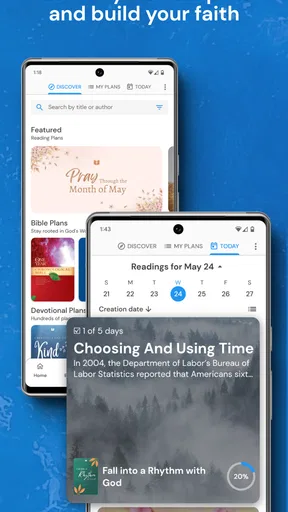
The app includes the complete King James Version of the Bible with both text and audio features. Users can listen to the Bible narrated by skilled voice actors, bookmark favorite verses, and make notes. The app also offers daily reading plans, a search function, and customizable font sizes for easy reading.
Is the Holy Bible King James + Audio app free to use?
The app is free to download and provides access to the full text of the Bible. However, some features, such as audio narration and advanced study tools, may be available through in-app purchases or a subscription model. Check the app store listing for details on pricing and available features.
How user-friendly is the Holy Bible King James + Audio app for beginners?
The app is designed with simplicity in mind, featuring an intuitive interface that is easy for beginners to navigate. Users can quickly access different books and chapters, adjust reading settings, and explore features like bookmarks and notes. Helpful tutorials and guides are also available to assist new users.
Can I share verses from the Holy Bible King James + Audio app on social media?
Yes, the app allows you to share your favorite verses directly to social media platforms or via messaging apps. This feature makes it easy to share inspiration and scripture with friends and family. Simply select the verse you wish to share and choose your preferred sharing method from the options provided.


